 This article is about integrating the hippo cms with a spring framework application. To be honest, the amount of integration is very easy if you know how to configure the api that is provided by hippo. So what are we going to do? In this article I am going to describe the high level architecture of a normal spring-mvc application that makes use of the hippo api to store and obtain content from the hippo content repository.
For this article I have made use of the hippo 6 version. Things might change a lot when you are dealing with hippo 7. Starting release 7, hippo is fully compliant with the Java Content Repository API.
Continue reading if you want to learn about how to integrate hippo 6 with springframework.
Before jumping into the code, let’s have a look at the general architecture of the application:
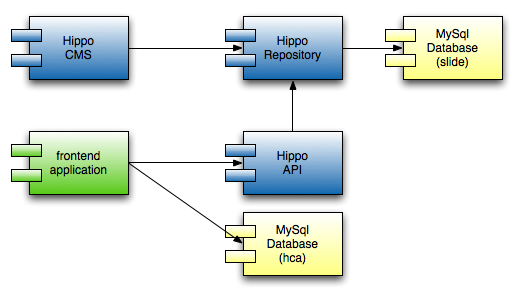
There are two front end applications. You can use the hippo cms to create content and configure your repository. This is usually not a front end normal visitors will see. For Hippo 7, the cms is completely rewritten. And to be honest, they did that for a good reason. But that is not what this article is about, so that is the last thing I have said about it.
The other front end application is the “frontend application” :-). This is the actual spring framework application. Here you can find the base architecture for a pretty standard spring mvc application. For completeness, I’ll give you an overview for that as well.
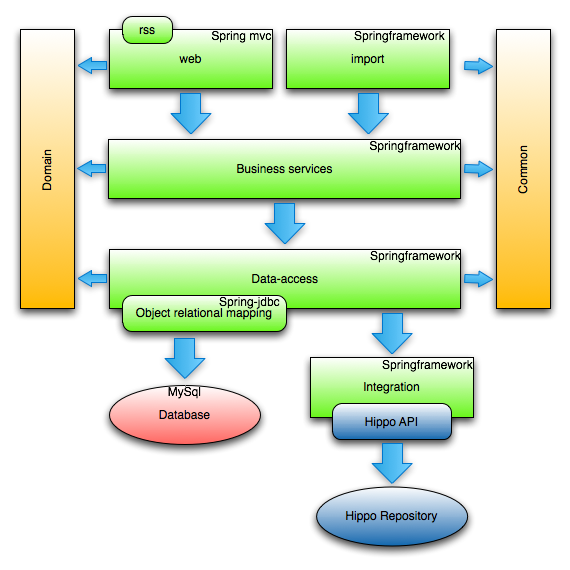
The design contains the usual layers: interaction (web and import), business, dao, domain and common. To completely separate the hippo stuff, I have moved them into an extra integration layer. This layer embeds the hippo api. This is also the module I’ll focus on. Next to that I will also show some samples of a HippoDao class and most of all the abstract parent for all hippo data access classes.
Let’s start with the integration module, there is one class that is the interface to the hippo repository. Let’s call the interface the content connector and the the actual implementation the HippoContentConnector. To be able to connect to the repository, we have the availability of the hippo api. There are some components that we need to use to connect to hippo.
- nl.hippo.client.webdav.service.WebdavServiceImpl – implementation that actually does the communication with the repository using the webdav functionality.
- nl.hippo.client.event.service.UpdateNotificationServiceImpl – This service is used by the api to invalidate it’s cache. It gets messages via jms with information about updated repository items.
- nl.hippo.client.caching.service.CachingServiceImpl – As the name says, this is all about caching. It is used by the webdav service to determine if an item should be obtained from the repository or not.
- nl.hippo.client.api.event.EventAwareManager – The relationship between the update service and the caching service. The event manager receives the events and notifies the caching service.
The following image clarifies the relations that are available and that we need to create spring beans for. A few of the beans are not yet discussed. They are used to configure the other beans. In the image all the greens beans are hippo provided classes, the yellow ones come from the project. They are just factory beans to provided the appropriate configuration.
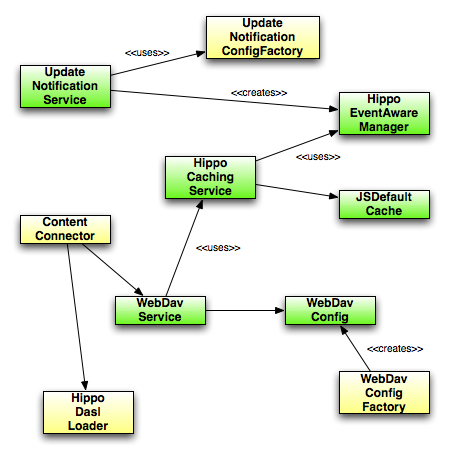
Next step is to have a look at the actual spring configuration:
< ?xml version="1.0" encoding="UTF-8"?>
<beans xmlns="http://www.springframework.org/schema/beans"
       xmlns:xsi="http://www.w3.org/2001/XMLSchema-instance"
       xmlns:aop="http://www.springframework.org/schema/aop"
       xsi:schemaLocation="
              http://www.springframework.org/schema/aop http://www.springframework.org/schema/aop/spring-aop-2.5.xsd
              http://www.springframework.org/schema/beans http://www.springframework.org/schema/beans/spring-beans-2.0.xsd">
    <bean id="connectionProps" class="org.springframework.beans.factory.config.PropertyPlaceholderConfigurer">
        <property name="locations" value="file:${config.dir}/connection.properties"/>
        <property name="placeholderPrefix" value="$con{"/>
    </bean>
    <bean id="<strong>contentConnector" class="nl.jteam.knvb.integration.hippo.HippoContentConnector">
        <property name="webdavService" ref="webdavService"/>
    </bean>
    <bean id="<strong>hippoCachingService" class="nl.hippo.client.caching.service.CachingServiceImpl">
        <constructor -arg index="0">
            <bean class="nl.hippo.client.caching.JCSDefaultCache">
                <constructor -arg value="default"/>
            </bean>
        </constructor>
        <constructor-arg index="1" ref="hippoEventAwareManager"/>
        <constructor-arg index="2" value="default"/>
    </bean>
    <bean id="<strong>hippoEventAwareManager" factory-bean="updateNotificationService" factory-method="getEventAwareManager"/>
    </bean><bean id="updateNotificationService" class="nl.hippo.client.event.service.UpdateNotificationServiceImpl"
          init-method="start">
        <constructor -arg index="0" ref="updateNotificationConfigFactory"/>
    </bean>
    <bean id="<strong>webdavService" class="nl.hippo.client.webdav.service.WebdavServiceImpl">
        <constructor -arg index="0" ref="webdavConfig"/>
        <constructor -arg index="1" ref="hippoCachingService"/>
        <constructor -arg index="2" value="true"/>
    </bean>
    <bean id="<strong>webdavConfig" class="nl.hippo.client.webdav.WebdavConfig">
        <constructor -arg index="0" ref="webdavConfigFactory"/>
    </bean>
    <bean id="<strong>webdavConfigFactory" class="nl.jteam.knvb.integration.hippo.WebdavConfigFactorybean">
        <property name="webdavFilesPath" value="$con{webdav.filesPath}"/>
        <property name="webdavHost" value="$con{webdav.host}"/>
        <property name="webdavNamespace" value="$con{webdav.namespace}"/>
        <property name="webdavPassword" value="$con{webdav.password}"/>
        <property name="webdavPort" value="$con{webdav.port}"/>
        <property name="webdavProtocol" value="$con{webdav.protocol}"/>
        <property name="webdavRealm" value="$con{webdav.realm}"/>
        <property name="webdavUsername" value="$con{webdav.username}"/>
    </bean>
    <bean id="<strong>updateNotificationConfigFactory"class="nl.jteam.knvb.integration.hippo.UpdateNotificationConfigFactorybean">
        <property name="jndiInitialContextFactory" value="$con{jndi.initialContextFactory}"/>
        <property name="jndiProviderURL" value="$con{jndi.providerURL}"/>
        <property name="jmsConnectionFactory" value="$con{jms.connectionFactory}"/>
        <property name="jmsPassword" value="$con{jms.password}"/>
        <property name="jmsUsername" value="$con{jms.username}"/>
        <property name="jmsTopic" value="$con{jms.topic}"/>
        <property name="jmsReconnectDelay" value="$con{jms.reconnectDelay}"/>
    </bean>
</beans>
You can see from the config we make use of factory beans (webdavConfigFactory) and factory methods (hippoEventAwareManager). That is the most important part of the spring configuration. We now have a fully configured ContentConnector that knows how to do stuff with the hippo repository. Some of the methods that are implemented are the following:
DomDocument obtainDocumentByPath(String path);
DomDocument obtainDocumentByUUID(String uuid);
<t extends BaseDasl> CollectionResults obtainDocumentCollection(
    T dasl, boolean completeDocument);
void deleteDocument(String path);
void createDocument(String relativePath, InputStream content);
void updateMetadataForDocument(String relativePath, Property[] props);
The last part is using the content connector to actually obtain items from the repository. There are some things you need to take care of, one of them being obtaining data from the returned data. You probably need to do some marshalling and unmarshalling. We used an abstract class to make it easier to create dao classes. The next piece of code is a method from the abstract class, just to give an indication.
protected T findItem(String path) {
    DomDocument foundDoc = getContentConnector().obtainDocumentByPath(path);
    if (foundDoc == null) {
        throw new ResourceNotFoundException("Request not found: " + path);
    }
    return unmarshalHippoDoc(foundDoc);
}
That is about it for this blog item. The source is not available online like usual, if you have additional questions, please use the comments.
Thanks for this article and this is exactly what I was looking for. I am in the process of developing a proof of concept to understand this same architecture (separation of conerns) with Hippo as content repository and CMS. As a newbie to Hippo not sure where to start with to achieve this. Can you please provide me with any help or some direction how I could go about doign this? I would appreciate it lot.
Check the age of this post. This is a very old post. It is based on hippo 6. In hippo 7 a lot has changed. Hippo nowadays comes with the hippo site toolkit with reasonable spring integration. Id have a look at that one first. If you really want to develop your own site and use hippo only for the cms, look for the hippo repository connector. We have also written a few blog posts on the jteam website: http://blog.jteam.nl. The last remark, use the forum of hippo, the people moderating the forum are very helpful.
I found your blog by chance . but i have to say that it’s great blog very useful information and very interesting subjects just greetings and good luck
i’m not going i will be always checking for updates.I’m very interested in CMS and all its related subjects.
Pingback:A perspective on content management « JTeam Blog / JTeam: Enterprise Java, Open Source, software solutions, Amsterdam
Thanks for this great article Jettro! It’s very clear and I hope very useful for a lot of people!
Useful if you want to use Hippo repository on your front end web apps. Thanks for this; pity I didn’t have it 3 months ago 😛