 Last week I attended a groovy & grails training by SpringSource. My first introduction into grails is about 2 years a go. I attended a talk at the spring experience. Back than I liked it, tried it, but did not really use it. By now a lot has changed, most of all very good tool integration by intellij. Last week I had the change to go to a training, now I am motivated to start using grails more often.
This post I will talk you through a grails application I have created for a project of mine. I also take you through some of the things I learned last week. Finally I’ll show you that you can create a google app engine application using grails. There are ways to create grails applications, I’ll show you how to do it using the latest intellij 9 beta release.
Training
As mentioned in the introduction I attended the spring source groovy and grails training. The training was given by Peter Ledbrook, author of grails in action. I am not going to give a detailed description of the training. I did like the training, it gave a good overview of the possibilities of grails as well as the groovy language. And yes, I am now very interested in the options of groovy. Especially for creating web based applications with grails, groovy just shines. Not sure when I should use groovy and when normal java. Have to explore to find out. Some of the things I liked about groovy are:
- Assignment of parameters that are evaluated immediately ${age} or when used ${->age}
- Using negative indexes in arrays: [1 .. -2] strips of the first and last item from an array
- Groovy truth, explicit use of values in a comparison. null, 0, “” and [] are all false in a comparison
- Closures, still hard to determine when to use a closure and when a method. But closures are used very often in groovy.
- Out of the box test integration with things like: MockFor, Expando, and as a plugin GMock.
Of course we learned a lot more than this, check the training or the book yourself if you want more. Next up was grails. I did look at grails before at grails, but tool support was pretty limited back than, and the plugins were not really widely available. A lot has changed since than. SpringSource came out with grails support in SpringSource Tool Suite, and Intellij has grails support as well. To be honest, intellij was much more productive than STS. Actually STS was almost not useable. Since it was the first release with grails support it will most probably improve the coming releases. Intellij worked very nice out of the box (I did use the beta version of intellij 9. Some of the features I liked during the training are:
- Gorm, I must mention this Groovy/Grails Object Relational Mapping framework first. This is very important for grails and why it is so productive. I just love these dynamic finders (more later).
- Plugin architecture, the easy of installtion and usage of plugins is very nice. I like the db-util plugin for its simplicity and the help when working with internal memory databases. A killer plugin during development.
- Scaffolding, for auto responding to CRUD like operations.
- flash parameter to be used for adding something to the session for just one request. Ideal for passing messages.
- Using templates, ideal for doing ajax calls and reuse of small view elements.
Oke time to get our hands dirty, next up is a short introduction in the sample I am going to create. Than some code (which is acutally not that much)
The application to create
For a customer at JTeam, we have a large amount of servers that we need to prepare. The actual preparation is mostly done by the hosting provider. Sometime we have no idea what the status is of some servers. We started to use an excel sheet to communicate the status among our team. This is not ideal and I decided to create a small grails application for this. It’s all very basic, but useable.
Every server has a status, some comments and an external ip address. Each server is also part of a number of vlans and belongs to an environment (dev,test,accep,prod).
The code
The code is available online at github. Yes I know, it is not at google code. I got extra motivated to start using git since the training. Peter was working so flexible with his source code, I want that too. The best way to learn something is by doing it. Therefore I create a git repository at github. You can find out more at the following url. There is a very easy way to download the complete source code without using git, check the page.
http://github.com/jettro/MyServerPark
The basics
Starting a grails project is very well documented on the grails website. Except for one controller, the OverviewController, all controllers use: def scaffold = true. Which means I don’t write any code. Also not view components. I did create some domain classes that have relationships with each other. The next sections cover the different elements of the application.
The domain model
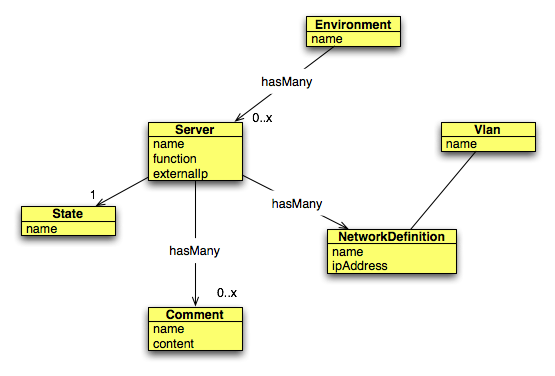
Some things to know about the domain model:
- belongsTo is used to declare a relationship of many-to-one, the next line gives an example for Comment. This gives the comment a property server.
- The comment class also gives meta data about the mapping and the type used for the database as well as constraints. In the example we create a field for larger amounts of text.
static belongsTo = [server:Server]
class Comment {
    String name
    String content

    static belongsTo = [server:Server]

    static mapping = {
        content type: "text"
    }

    static constraints = {
        name(blank:false, maxSize:50)
        content(blank:false, widget:"textarea")
    }
}
static hasMany = [servers:Server]
Check the code for more examples of relationships.
Scaffolding controllers and views
Grails makes use of scaffolding, this can be static and dynamic. In the static case, code is being generated and can be altered. The dynamic case is evaluated runtime. In this project I tried to use dynamic scaffolding as much as possible. Usability might not always be what you want. In that case you should use static scaffolding or create something yourself. I managed to do well with the scaffolding on dynamic (except for the google app engine sample). But let us focus on the customer controller.
The overview controller
Grails makes use of convention over configuration. This is also true for controllers and views. The overview controller listens to the /overview url and points to the overview.gsp file. The following code block gives the complete OverviewController groovy class.
class OverviewController {
    def show = {
        redirect(uri:"/server/show/${params.id}")
    }

    def comments = {
        def currentServer = Server.findById(params.id.toLong())
        def allComments = Comment.withCriteria {
            server {
                eq("id",currentServer.id)
            }
        }
        render(template:"/shared/comment",model:[comments:allComments, server:currentServer])
    }

    def index = {
        def environments = Environment.list()
        [environments:environments]
    }
}
There are three methods in the controller. The show does a redirect to the show method of the server controller. The index returns list of all environments and uses the view index.gsp. The comments method is a different cup of thee. This responds to an ajax call and returns a fragment. focus on the last line for now. You can see we use the render call. This makes use of a template. Using the render call, we obtain the html and push it back to the client. The section about views will give a bit more detail. Next up are the dynamic finders
Dynamic finders
The previous code block gives a few examples of finders. In index we obtain all the environments with Environment.list(). This is the most basic finder. Another finder is in the comments method. There we obtain the server by an id. The call is findServerById and you provided an id. Another calls could be: findByFunction, findByFunctionLike “%database%”, findByFunctionIlike “%DataBase%”. You can also make combinations with And/Or and multiple parameters. Pretty cool.
The comments method also shows the Criteria API for looking up all comments for a specific server. These type of queries, limited by a related item, are not supported by the dynamic finders.
Gsp for views
Creating the views is not very hard. If you want to learn how it works, I suggest generating the scaffolding views. I want to focus on something that is just a little bit more advanced. Ajax calls. In my project I want to obtain all comments for a server using an ajax call. In the overview page we use a special tag from grails, the remoteLink. This tag does an ajax call to the server and prints the result in the div with provided id.
<g:remoteLink action=”comments” params=”[id:server.id]” update=”comments”>comments</g:remoteLink>
As you can see, we provide the server.id and we update the div with id comments.
This does not work out of the box, you must specify the prototype javascript library to be included. You can do this in the file:
views > layouts > main.gsp
Add the following line:
<g:javascript library=”prototype” />
Now everything should be fine and you can test the application. A command like grails run-app should be enough.
Documentation
If you want more information about grails, try the following references:
- http://grails.org/doc/1.1.x/
- http://groovy.codehaus.org/groovy-jdk/
- http://www.manning.com/gsmith/
- http://www.jetbrains.com/idea/nextversion/index.html
- http://www.springsource.com/training/grv001
- http://www.springsource.com/products/sts
Grails and google app engine
Grails uses plugins for all additional functionality. There is also a plugins available for google app engine. There is already good documentation available for this plugin. Therefore I keep this short. The following code block shows the commands. For more information, check the website of the plugin:
http://grails.org/plugin/app-engine
# grails create-app share-this
# grails uninstall-plugin hibernate
# grails install-plugin app-engine
choose jpa when asked
# export APPENGINE_HOME=<path to your sdk install of google app engine>
# grails app-engine run
# grails set-version 1
# grails app-engine package
# $APPENGINE_HOME/bin/appcfg.sh update ./target/war
# grails install-plugin gorm-jpa
Than I used intellij to create some domain classes and controllers. Take the following into consideration.
- Put domain classes in a package or it won’t work
- Put Controller classes in the same package
- generate views, the auto scaffolding seems not to work.
You can look at the result here : http://share-this.appspot.com/. It could well be that the app does not start the first time, a refresh might help. I’ll have a look at this in the future. There is a problem with the CPU consumption and my grails application.